


AMZ123跨境卖家导航
拖动LOGO到书签栏,立即收藏AMZ123
首页跨境头条文章详情

7 Ways to Promote Your Amazon Listings

17434
2018-09-22 23:22
2018-09-22 23:22
17434

注:转发一篇外媒的文章,想和大家说一声,我很快就要回归了。

Now that we are aligned on why selling on Amazon is so valuable, let’s get into more of the how. Once you're up and running on Amazon, it's time to start promoting your listings. Like any other sales channel, the more you put in, the more you get out of it. It's not enough to sit around and wait. Today we're going to cover seven ways to promote Amazon Professional Sellers Account listings and drive more sales:

  1. Run a Competitor Analysis

  2. Get Your Pricing Right

  3. Optimize Your Product Listings

  4. Encourage Reviews

  5. Run Sponsored Product Ads

  6. Take Advantage of Promotions

  7. Drive External Traffic

1. Run a Competitor Analysis

The first step to promoting your Amazon listing is to understand what you’re up against. For most categories, you can learn a tremendous amount about what customers want and don’t want based on competitor pages. Additionally, reviewing complementary products regularly can alert you to best practices and/or promotional opportunities. Specifically:

  • Read customer reviews and Q&A for competitor pages. Customers are very clear on what their preferences are, and oftentimes can lead you to future product enhancements or ideas. Are customers complaining about packaging? How many customers mention price in their reviews? What other products have they mentioned trying in the same category?

  • How often are competitors updating product content, pictures, or other content? Are they cycling through seasonal photos (i.e. Christmas or Halloween themed?) Do they have clearer messaging of product benefits and usage than you do? How often are they changing pricing and what effect does that seem to have on their Best Seller Rank?

  • For complementary categories (for example, memory cards and cameras), what are those brands doing well in? Is there an opportunity to cross-promote with them? Are there any insights on their customer reviews about what lead them to that purchase and how that may affect how they search for your product? Does it make sense to target those category keywords on your Sponsored Product campaigns? 

  • Finally, move quickly. If you see a competitor is out of stock, that may be a good time for you to lower pricing and/or increase ads. If you see that competitor reviews are increasing at a faster rate than you, try to figure out the cause. Look for new and innovative ideas such as images or product content from broader categories, and implement them before your competitors.

2. Get Your Pricing Right

Finding the right pricing for your products is tough enough as is, but add Amazon’s complexities and an open marketplace for other sellers to compete with you, and you have quite a handful. However, if you keep some key considerations in mind, you can hopefully prevent other larger issues from arising.

  • Your selling agreement with Amazon includes a pricing parity clause. Your item price and total price can’t be lower at any other online sales channel according to the ‘general pricing rule’. This includes your own Shopify site. Avoid a potential account suspension for not following this mandate and ensure that you price Amazon as low as your other channels.

  • Since Amazon is a marketplace, you may very well be competing against other third parties to ‘win the buy box’. There are several repricing tools available on the market, and Amazon recently released the ‘Automate Pricing’ tool on Seller Central to help you automate pricing decisions.

For example, you can set a rule to “beat the lowest Fulfilled by Amazon price by $0.10”. Ensuring you are winning the buy box regularly, and/or being alerted when you are losing the buy box, is essential to growing your Amazon business. Note that pricing for Vendors has a different process from Professional Sellers.

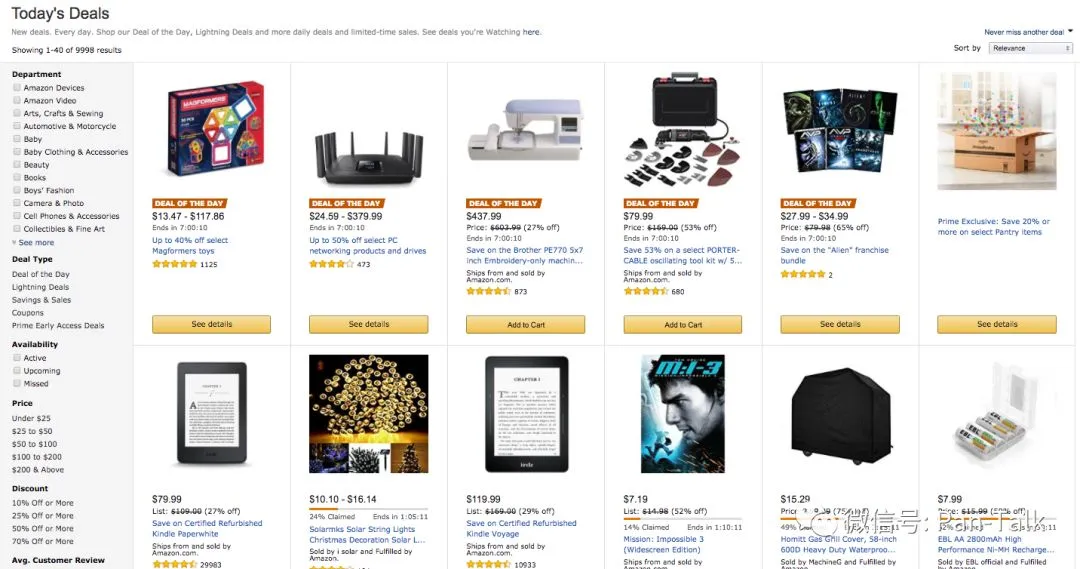
Promotions are a great way to increase visibility and gain reviews. Lightning Deals, price discounts, best deals, coupons, buy one get one offers, etc. are all great opportunities to offer and highlight a temporary discount to your product.

3. Optimize Your Product Listings

Ecommerce shoppers, particularly on Amazon, make a decision within just seconds on whether they want to further engage with a detail page or go back to search results. How do you pass this initial hurdle so that a customer goes below the fold and seriously considers purchasing your product? Start by making it simple for them.

  • Titles matter. Does your title clearly describe to customers what the item is and if it is compatible with their needs? Does it mention the brand name? Does it clarify what the use case is or primary benefit? And most importantly, does it do all of this concisely so it isn’t too long to skim?

  • Bullets are your elevator pitch. Make sure to hit all of the key areas that customers need answered before they have to scroll below the fold on desktop or to additional sections on mobile. Mention key facts like if there is a warranty or customer service available to troubleshoot issues. Also avoid having bullets that are more than a few lines long since most customers are skimming this section.

  • Pictures are important. Your main photo should clearly show what the product is before zooming/panning in. Additional photos should provide additional angles of the product, and if relevant lifestyle imagery. It is also probably worthwhile having one image of the ‘back of the box’ showing ingredients, instructions, etc.

  • Product descriptions matter too. Remember that customers are skimming so a 10-line long paragraph probably won’t do the job. Use your brand voice here and reiterate key selling points while mentioning any supporting facts that can help customers understand why they need to buy now.

Here is an example of a detail page before and after it updated the key items to maximize conversion.

Before updates:


After updates:

Here are some other key items to keep in consideration when setting up or updating detail pages:

  • Don’t play the keyword stuffing game. Approach it from a customer’s perspective on information they need to be convinced it’s worth the purchase. Amazon has stated its mission is “to be Earth’s most customer-centric company…” and that is a great way to approach incorporating keywords into your page contents rather than gaming the system with irrelevant keywords.

  • Regularly check your pages for questions and new reviews. Many customers spend more time reviewing customer questions and reviews than a brand’s published content, so be sure to regularly check and respond to these as necessary.

4. Encourage Reviews

It’s no secret that reviews are extremely important. We have likely all bought something on Amazon, and in many of those cases the decisions came down to which product had the better reviews. Furthermore, as I mentioned at the beginning, reviews on Amazon will have an impact on other channels, including your Shopify site, since customers tend to do research on Amazon first.

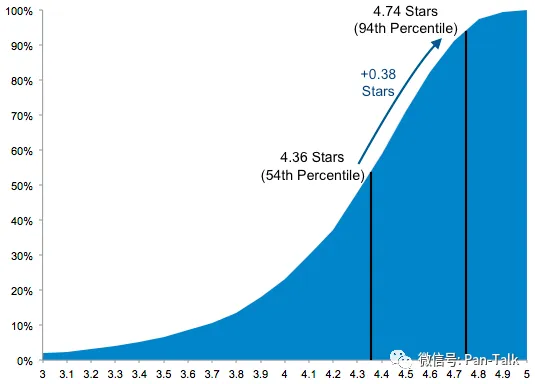
On that note, Amazon recently made a change to its review policy that you may have heard about. The summary of it is that Amazon is banning reviews for discounted products for Professional Sellers. Previously, many brands would provide discounted or free products to customers through a variety of channels including review sites in exchange for a review. A recent study of over 7 million reviews showed that the average rating for incentivized reviews were meaningfully higher than non-incentivized reviews.

The good news is that the recent change makes things more of a level playing field since brands were essentially penalized for not getting incentivized reviews if their competitors were.

So, what can you do to get reviews? Email follow-up.

Sellers are allowed to send follow up emails to customers related to a specific order, and there are several automated services available that can help you manage this process. The guidelines are here, but in summary you ma not:

  • send emails with marketing or promotional messages

  • have links to other websites

  • demand, ask for, or incentivize positive reviews

You can, however, send a few emails confirming you have received an order, and also following up on an order requesting them to leave feedback.

There are tons of best practices out there, but I’d recommend sending no more than 2 emails: one during the order confirmation and one a few weeks after the product was received. Avoid making your emails feel too ‘spammy’ or aggressive, and give customers an outlet to share negative feedback directly with you prior to writing a negative review.

Services such as Feedback Five or Feedback Genius can automate the process and make your life a lot easier.

5. Run Sponsored Product Ads

Amazon has a robust ad platform that allows you to market your product to customers on Amazon. 

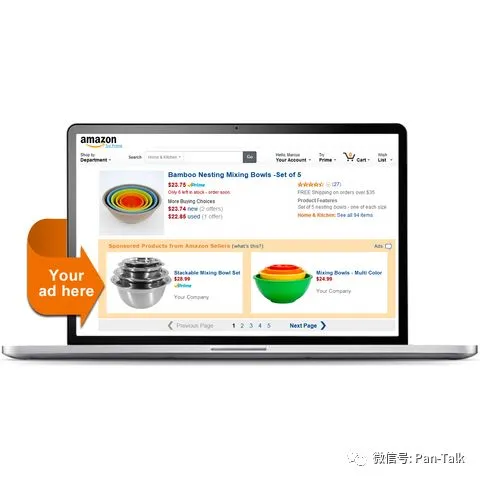
Amazon Sponsored Product Ads is a PPC (pay per click) model that allows you to promote your products along search results. Placements on desktop can be above, alongside, or below search results as well as on product detail pages.

Placements on mobile appear below search results and on product detail pages.

I could write an entire guide about Sponsored Ads but here's a simple three important steps to get up and running quickly:

Step 1: Start with automatic targeting. This allows Amazon to use its powerful search algorithms to suggest an exhaustive list of potential keywords for you. This requires you to pick a flat default bid across all keywords, but the goal here is to get data on how various keywords perform.

Step 2: Once you have at least a few weeks’ worth of data (the longer the better), start evaluating your automatic targeting campaign to determine which keywords performed the best. You will want to transition those over to a manual campaign, where you can now focus on only the most relevant keywords that performed well for you. With a manual campaign, you have the ability to adjust bids by keyword

Step 3: Continue to iterate your manual campaign for keywords and bids. Data is your best friend, but if you feel strongly that you should include additional keywords that haven’t yet performed well, test various bid amounts. Different bid amounts can yield various placements and yield varying results, so continue to test until you find something that works well.

6. Take Advantage of Promotions

Promotions including Lightning Deals are a great way to sell units at an increased velocity, ultimately leading to more reviews. The goal is not to always be on promotion or providing deep discounts, but if you can sprinkle these in towards the beginning of your product lifecycle on Amazon, it is a great way to gain additional reviews and build relevancy so other customers can find you.

Sellers can also opt in for their products to be included in the Early Review Program. Amazon randomly selects customers who leave reviews and provides them with a small reward (such as a $1-$3 Amazon Gift Card) to thank them for sharing their unbiased review. There is no guarantee that this reviewer will provide a positive review, but it is a great opportunity for sellers to with new products.

7. Drive External Traffic

Many brands forget about this part, or reserve all external channels to point to their online store. While there is obvious value in directing external traffic blogs, Facebook Ads, Google AdWords, influencers, etc.) to your own site, those same tactics will also work to promote your Amazon listings. 

Strategically decide which channels make sense to direct to Amazon. For example, bloggers, vloggers, and other influencers often love directing traffic to Amazon because they can collect an affiliate commission on any customers purchases that come from their custom link.

Final Thoughts

Amazon can be a very competitive and complex marketplace, but if you spend some time optimizing and promoting your listings, you'll be in a much better position to compete.

Don’t get distracted by trying to game the system. Instead, focus on what you would want to see if you were the customer: clear and descriptive pages, competitive pricing, reputable and high quality reviews, and a trustworthy and responsive seller.

If you can focus on the things that matter and do so with a professional and credible demeanor, you are already ahead of many competitors. Now go get selling!


免责声明
本文链接:
本文经作者许可发布在AMZ123跨境头条,如有疑问,请联系客服。
最新热门报告作者标签
俄罗斯电商市场快速增长,综合平台优势大于独立站
AMZ123获悉,近日,Euromonitor、EMARKETER及Yakov and Partners发布了《俄罗斯电商市场发展现状》报告。报告基于2020-2024年的数据,对俄罗斯电商市场的发展趋势、综合电商平台与独立电商的竞争格局、各品类表现、未来市场预测进行了系统分析。一、俄罗斯电商趋势1.互联网渗透率增长放缓2020至2024年,俄罗斯互联网使用率从78.1%(约9560万用户)提升至85.5%(约1.04亿用户),四年间增加7.4%(新增约790万用户)。俄罗斯的互联网渗透率增速正在逐年放缓,预计到2029年互联网渗透率将达到89%(约1.08亿用户)。
越南加强进口商品监管,修订多项增值税和海关规则
AMZ123获悉,近日,越南海关公布了2026年对增值税(VAT)、特别消费税(SCT)及电子交易管理的多项修订,核心在于统一税制规则、扩大免税范围并加强跨境与电子化申报管理。此次调整既有减轻企业合规成本、扶持出口与产业链升级的内容,也伴随对部分消费品与临时进口再出口环节的更严监管,直接影响生产、进出口和跨境电商卖家。在增值税方面,新法律将此前零散的官方函件并入法律和配套法令,提升透明度并便于电子化处理。关键变化包括扩大增值税免税目录:列入政府清单的自然资源与矿产(无论原料还是加工品)在出口时被明确归为增值税免税项目。
TikTok Shop黑五复盘,一堆中国卖家晒出百万GMV
黑五复盘,TikTok卖家:“库存差点给我爆完了!”
存生命危险!美国CPSC紧急召回超1万件儿童手写板玩具
AMZ123获悉,近日,美国消费品安全委员会(CPSC)宣布,紧急召回亚马逊在售的KTEBO品牌的儿童书写板玩具,原因是该产品未能符合玩具类产品的强制性安全标准,电池仓固定螺丝无法保持牢固,可能导致纽扣电池外露。若儿童误吞纽扣电池,可能造成严重伤害、内部化学灼伤,甚至威胁生命。此次召回涉及KTEBO品牌的双件套书写平板玩具,召回数量约10,380件,产品提供四种颜色组合,包括粉色/蓝色、绿色/黄色、橙色/蓝色以及紫色/红色,并有8.5英寸与10英寸两种规格,每套配有与机身同色的手写笔。
AliExpress波兰11月增长显著,双十一活动日活用户增长37%
AMZ123获悉,近日,AliExpress的数据显示,平台11月的消费者参与度与卖家销售额大幅增长。今年11月11日至19日举行的AliExpress双十一购物节活动期间,波兰用户的参与度显著提升,日活跃用户数量同比增长37%。随着去年秋季AliExpress开放波兰本地卖家入驻,今年波兰本地卖家的参与度也明显提高,他们在此次双十一促销期间的GMV同比增长74%。从消费偏好来看,智能生活类产品持续吸引波兰消费者,智能家居与清洁设备成为销售榜单的主导品类。Dreame、ILIFE、Laresar等品牌的扫地机器人和自动吸尘设备进入最畅销产品行列,反映波兰家庭对智能化、便捷化生活方式的需求不断上升。
亚马逊印度计划投资127亿美元,推动本地云和AI基础设施建设
AMZ123获悉,近日,亚马逊宣布,将在2030年前进一步推动人工智能在印度的普及,计划投入127亿美元建设本地云和AI基础设施。亚马逊表示,这项长期投资将为超过1500万家中小企业带来AI应用能力,同时在2030年前为400万名公立学校学生提供AI素养课程与职业教育,提高数字技能普及度。亚马逊认为,AI正成为提升印度数字包容性的关键力量,能够突破语言、读写能力与访问渠道的限制,让更多个人与企业受益。在中小企业领域,亚马逊正在推出新一代AI工具,以降低经营门槛、简化业务操作并提升增长效率。
“黑五网一”DTC投放数据复盘,流量都去哪了?
2025 年“黑五网一”大战,终于落下帷幕。除了 GMV ,这场仗花了多少“弹药”,你算清楚了吗?流量场上的每一发子弹,都正中靶心了吗?偏离的原因找到了吗?除了看自己后台的数据,还要看清整个大盘的趋势——这决定了我们下一步该往哪儿走。基于 GoodsFox 监控的投放数据,我们有以下发现:服装、美妆的竞争力度只增不减3D 打印与机械键盘,从“小众圈层”跃升为热门赛道宠物经济的流量稳定,不靠爆点也能撑起大盘这些变化背后,都在重塑今年“黑五网一”的投放结构,我们先从流量基本盘讲起——尽管每年都有新风口,但从广告投放的绝对体量来看,传统大盘仍在支撑整体流量水位。
还在“索评”?亚马逊Review管理的红线与出路
亚马逊的评论管理格局是如何改变的?首先要明确一点:过去几年,亚马逊的Review生态系统发生了剧变,这对各类管理工具产生了深远影响。在买家端,那些专门用来标记“虚假评论”(或帮助买家鉴别真伪)的老一代工具正在失效甚至消失。不少买家就因为Fakespot在平台冲突、合规问题和数据接口变更的压力下关停而感到措手不及。Fakespot是一个分析电商产品评论真实性、帮助消费者识别虚假评价的平台。在卖家端,亚马逊的政策合规和风控机制变得更加严厉。这意味着Review的风险红线变了:以前那些“地毯式索评”或“送测(Giveaway)”的套路可能有效,但现在操作这些手段的封号风险极高。
AMZ123PayPal计算器使用指南及常见问题详解(内附计算公式)
Paypal手续费计算器介绍及计算公式分享 https://www.amz123.com/tools-paypal
重磅!亚马逊公布2026年战略重心变化
AMZ123获悉,12月4日,2025年亚马逊全球开店跨境峰会上,亚马逊回顾了过去一年里中国卖家在亚马逊上所取得的进展,并围绕2026年四大业务战略重点——供应链服务、AI赋能、全球拓展布局、本地服务,揭晓了40余项创新举措。根据亚马逊披露的数据:2025年以来,中国卖家通过亚马逊全球站点售出数十亿件商品,在美欧等成熟站点的销售额增长超过15%,在新兴站点的销售额增长超过30%;2025年以来,销售额达到200万、500万、800万美金的中国卖家数量,增长均超过20%;销售额超过1000万美金的中国卖家数量,增幅近30%。
卖家还在等口径!欠税公示制度却已明确落地
卖家还在“等政策”,但政策已明确趋严过去几个月里,跨境卖家对税务政策最大的期待就是——“能不能再等等,看会不会有新口径”。但事实上,政策并没有往宽松走,而是沿着“数据透明—提醒申报—强化监管”这条路径一步步推进。AMZ123了解到,目前已有超过7000家境内外平台完成涉税信息报送,卖家的线上线下销售数据已全面纳入监管体系。随着数据比对展开,税务部门对申报明显低于平台数据的经营者陆续发出提示,要求补充申报;多数卖家在收到提示后完成了更正,但也的确还有部分经营者迟迟没有动作,继续处于观望甚至低申报的状态。在这种情况下,监管的态度也开始变得更为明确:对于未按规定申报的行为,将从提醒阶段进入到强化管理阶段。
亚马逊新功能,能救你一整条链接!
最近有卖家后台发现,亚马逊多了一个新功能,看起来不起眼,实则很关键——绩效提醒(Performance Notifications)。这个功能解决了我们运营过程中的一个老大难:链接出问题时能不能第一时间被提醒?以前我们发现Listing出状况,大多靠“事后诸葛”:出单突然断了,去查是不是被下架;关键词排名一夜暴跌,才想起去对比转化率;广告Acos拉爆、CTR异常,才知道图可能挂了;等你发现问题,可能已经晚了。这次,亚马逊终于“良心发现”,开始主动提醒你链接的数据异常了。这个新功能到底能干啥?说白了,它就是一个链接级别的数据异常预警系统。
汽配类目又现吸金王,TikTok卖家30天入账1100万
月销量暴涨36007900%,这一汽配用品在TikTok卖爆了
宠物消费持续升温,亚马逊10款月销过万宠物产品推荐
AMZ123获悉,近日,亚马逊各类产品搜索量增长显著,以下10款产品在亚马逊上销量表现突出,深受消费者欢迎。1. 猫咪情绪舒缓喷雾预计销售额:139.84万美元/月销量:26,000+星级评分:4.4好评数量:12,694+图源:亚马逊产品描述:FELIWAY Optimum猫咪情绪舒缓喷雾的专利信息素复合物能显著减少猫咪的应激表现,包括喷尿、抓挠、恐惧反应、紧张冲突等。产品无药性、安全且不干扰人类与其他宠物,每个喷雾覆盖面积约 700 平方英尺。
跨界AI失败?深圳大卖资产重组终止!
12月2日,跨境3C 配件大卖杰美特发布公告,宣布决定终止筹划以现金方式收购AI 算力解决方案提供商思腾合力(天津)科技有限公司(以下简称“思腾合力”)控制权的重大资产重组事项。这场筹划半年、备受行业关注的跨界收购突然落幕,消息一出引发市场热议。AMZ123获悉,杰美特于2025年6月21日首次披露了筹划重组的提示性公告,拟通过现金交易控股思腾合力,该交易初步测算构成重大资产重组,且不涉及发行股份、不构成关联交易,也不会导致公司控制权变更。杰美特是“中国手机壳第一股”,主营业务为移动智能终端保护类产品的研发、设计与销售,产品包括手机、平板及穿戴设备的保护壳与表带等。
25-cv-14634,橙色小雏菊花卉图案有TRO冻结风险,已立案维权!
本案是keith律所代理英国艺术家Rachael Taylor发起的版权维权案件,涉案作品为一张 1970年代小雏菊花卉图,该作品于2025年6月24日获得美国版权认证,版权号为:VA 2-455-354,被广泛用于面料印刷、家居装饰以及礼品包装等多个领域。
《亚马逊生活日用品类攻略手册》PDF下载
作为日常生活不可或缺的重要组成,生活百货品类覆盖范围广泛,包括家居用品、家具、车用配件、户外装备、园艺 工具、运动器材、家装用品、厨房、玩具以及宠物用品等众多领域。这类产品不仅是满足基本生活所需,更体现了人们对美好生活的向往和追求。
《掘金泰国-市场洞察与战略机遇报告2025》PDF下载
随着全球经济一体化的加速,泰国作为东盟的核心枢纽,凭借其独特的地缘优势庞大的消费市场以及持续优化的营商环境,成为众多企业战略布局的重要目标。本报告深入剖析泰国市场的政策红利、消费趋势、产业机遇以及合规挑战,旨在为有志于开拓泰国市场的中国企业提供行动指南,助力企业在东盟这片充满活力的土地上把握机遇、应对挑战、!实现可持续发展。
《2025欧美假日购物季营销指南》PDF下载
2025年美国假日购物季零售额预计同比仅增长1.2%,总销售额约1.359万亿美元,虽仍保持正增长,但为2009年以来最低增速,市场正在步入低增长的新常态。
《2025年跨境电商东南亚市场进入战略白皮书》PDF下载
东南亚电商,正以惊人的速度复刻中国电商高速增长的黄金时代。2024年东南亚电商GMV达到1284亿美元,短短5年涨幅超过3倍。全球电商2024年GMV增幅最快的十大市场中,东南亚独占四席。东南亚是拥有约6.7亿人口的广阔市场,在现今全球关税的不确定性大格局下,因其电商基建完善,利好的贸易政策,和更高的年轻人口占比,成为跨境卖家生意拓张焦点之一。
《2025年TikTok Shop玩具品类行业报告(欧美站)》PDF下载
分析TikTok Shop美国市场、英国市场、西班牙市场、墨西哥市场等主流市场点短视频及直播电商数据,选取TikTok与玩具爱好品类相关的内容进行分析报告。
《2025 洗护品类趋势与创新洞察》PDF下载
本报告独特价值:将消费者的“行为结果”据),揭示消费者深层心理动机、并能精准预判未来增长机会
《亚马逊双轨增长指南》PDF下载
亚马逊以“以客户为中心”为核心理念,通过整合B2B与B2C的全渠道服务,帮助卖家实现“一店双拓”-- 一次上架,同步触达个人消费者与企业买家,获得双重收益。同时,基于Direct to Buyer(直接触达买家)的模式,更能有效减少中间环节,提升利润空间与品牌掌控力。
《亚马逊全球线上商采趋势与区域洞察》PDF下载
随着全球企业数字化转型的深入推进,B2B商采有望成为下一个万亿级别的蓝海市场然而,中国卖家在开拓海外企业商采市场时往往面临着一个关键挑战:难以准确把握海外企业买家的商采行为和决策模式。这种认知偏差不仅影响了产品开发方向,也制约了市场拓展策略的制定。
欧洲电商资讯
AMZ123旗下欧洲跨境电商新闻栏目,专注欧洲跨境电商热点资讯,为广大卖家提供欧洲跨境电商最新动态、最热新闻。
跨境数据中心
聚合海量跨境数据,输出跨境研究智慧。
跨境科普达人
科普各种跨境小知识,科普那些你不知道的事...
亿邦动力网
消除一切电商知识鸿沟,每日发布独家重磅新闻。
跨境电商干货集结
跨境电商干货集结,是结合亚马逊跨境电商卖家交流群内大家在交流过程中最常遇到的问题,进行收集整理,汇总解答,将会持续更新大家当前最常遇见的问题。欢迎大家加入跨境电商干货集结卖家交流群一起探讨。
AMZ123选品观察员
选品推荐及选品技巧分享。
北美电商资讯
AMZ123旗下北美跨境电商新闻栏目,专注北美跨境电商热点资讯,为广大卖家提供北美跨境电商最新动态、最热新闻。
亚马逊全球开店
亚马逊全球开店官方公众号,致力于为中国跨境卖家提供最新,最全亚马逊全球开店资讯,运营干货分享及开店支持。
首页
跨境头条
文章详情
7 Ways to Promote Your Amazon Listings
北二环西路
2018-09-22 23:22
17433

注:转发一篇外媒的文章,想和大家说一声,我很快就要回归了。

Now that we are aligned on why selling on Amazon is so valuable, let’s get into more of the how. Once you're up and running on Amazon, it's time to start promoting your listings. Like any other sales channel, the more you put in, the more you get out of it. It's not enough to sit around and wait. Today we're going to cover seven ways to promote Amazon Professional Sellers Account listings and drive more sales:

  1. Run a Competitor Analysis

  2. Get Your Pricing Right

  3. Optimize Your Product Listings

  4. Encourage Reviews

  5. Run Sponsored Product Ads

  6. Take Advantage of Promotions

  7. Drive External Traffic

1. Run a Competitor Analysis

The first step to promoting your Amazon listing is to understand what you’re up against. For most categories, you can learn a tremendous amount about what customers want and don’t want based on competitor pages. Additionally, reviewing complementary products regularly can alert you to best practices and/or promotional opportunities. Specifically:

  • Read customer reviews and Q&A for competitor pages. Customers are very clear on what their preferences are, and oftentimes can lead you to future product enhancements or ideas. Are customers complaining about packaging? How many customers mention price in their reviews? What other products have they mentioned trying in the same category?

  • How often are competitors updating product content, pictures, or other content? Are they cycling through seasonal photos (i.e. Christmas or Halloween themed?) Do they have clearer messaging of product benefits and usage than you do? How often are they changing pricing and what effect does that seem to have on their Best Seller Rank?

  • For complementary categories (for example, memory cards and cameras), what are those brands doing well in? Is there an opportunity to cross-promote with them? Are there any insights on their customer reviews about what lead them to that purchase and how that may affect how they search for your product? Does it make sense to target those category keywords on your Sponsored Product campaigns? 

  • Finally, move quickly. If you see a competitor is out of stock, that may be a good time for you to lower pricing and/or increase ads. If you see that competitor reviews are increasing at a faster rate than you, try to figure out the cause. Look for new and innovative ideas such as images or product content from broader categories, and implement them before your competitors.

2. Get Your Pricing Right

Finding the right pricing for your products is tough enough as is, but add Amazon’s complexities and an open marketplace for other sellers to compete with you, and you have quite a handful. However, if you keep some key considerations in mind, you can hopefully prevent other larger issues from arising.

  • Your selling agreement with Amazon includes a pricing parity clause. Your item price and total price can’t be lower at any other online sales channel according to the ‘general pricing rule’. This includes your own Shopify site. Avoid a potential account suspension for not following this mandate and ensure that you price Amazon as low as your other channels.

  • Since Amazon is a marketplace, you may very well be competing against other third parties to ‘win the buy box’. There are several repricing tools available on the market, and Amazon recently released the ‘Automate Pricing’ tool on Seller Central to help you automate pricing decisions.

For example, you can set a rule to “beat the lowest Fulfilled by Amazon price by $0.10”. Ensuring you are winning the buy box regularly, and/or being alerted when you are losing the buy box, is essential to growing your Amazon business. Note that pricing for Vendors has a different process from Professional Sellers.
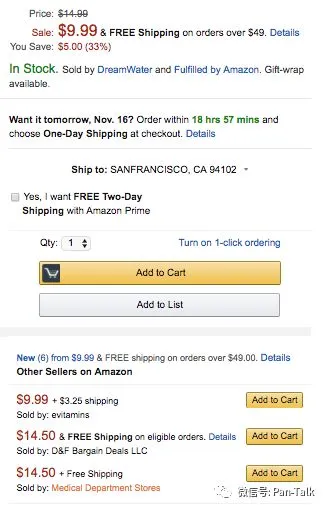
Promotions are a great way to increase visibility and gain reviews. Lightning Deals, price discounts, best deals, coupons, buy one get one offers, etc. are all great opportunities to offer and highlight a temporary discount to your product.
3. Optimize Your Product Listings

Ecommerce shoppers, particularly on Amazon, make a decision within just seconds on whether they want to further engage with a detail page or go back to search results. How do you pass this initial hurdle so that a customer goes below the fold and seriously considers purchasing your product? Start by making it simple for them.

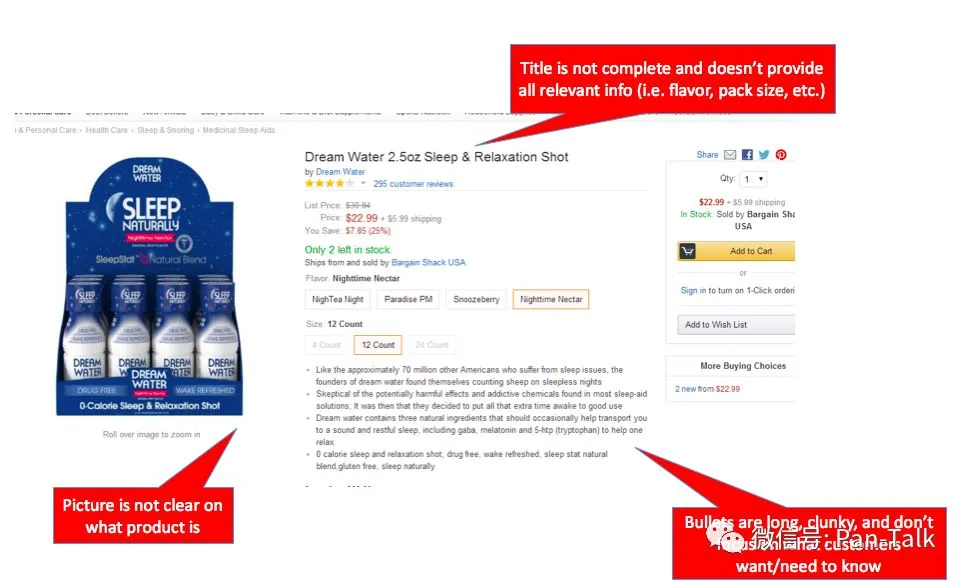
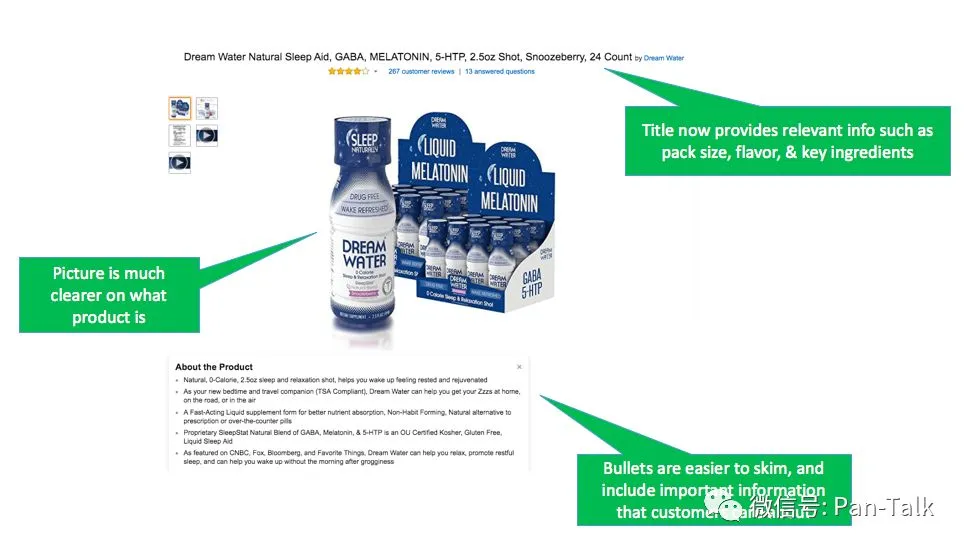
  • Titles matter. Does your title clearly describe to customers what the item is and if it is compatible with their needs? Does it mention the brand name? Does it clarify what the use case is or primary benefit? And most importantly, does it do all of this concisely so it isn’t too long to skim?

  • Bullets are your elevator pitch. Make sure to hit all of the key areas that customers need answered before they have to scroll below the fold on desktop or to additional sections on mobile. Mention key facts like if there is a warranty or customer service available to troubleshoot issues. Also avoid having bullets that are more than a few lines long since most customers are skimming this section.

  • Pictures are important. Your main photo should clearly show what the product is before zooming/panning in. Additional photos should provide additional angles of the product, and if relevant lifestyle imagery. It is also probably worthwhile having one image of the ‘back of the box’ showing ingredients, instructions, etc.

  • Product descriptions matter too. Remember that customers are skimming so a 10-line long paragraph probably won’t do the job. Use your brand voice here and reiterate key selling points while mentioning any supporting facts that can help customers understand why they need to buy now.

Here is an example of a detail page before and after it updated the key items to maximize conversion.

Before updates:

After updates:
Here are some other key items to keep in consideration when setting up or updating detail pages:

  • Don’t play the keyword stuffing game. Approach it from a customer’s perspective on information they need to be convinced it’s worth the purchase. Amazon has stated its mission is “to be Earth’s most customer-centric company…” and that is a great way to approach incorporating keywords into your page contents rather than gaming the system with irrelevant keywords.

  • Regularly check your pages for questions and new reviews. Many customers spend more time reviewing customer questions and reviews than a brand’s published content, so be sure to regularly check and respond to these as necessary.

4. Encourage Reviews

It’s no secret that reviews are extremely important. We have likely all bought something on Amazon, and in many of those cases the decisions came down to which product had the better reviews. Furthermore, as I mentioned at the beginning, reviews on Amazon will have an impact on other channels, including your Shopify site, since customers tend to do research on Amazon first.

On that note, Amazon recently made a change to its review policy that you may have heard about. The summary of it is that Amazon is banning reviews for discounted products for Professional Sellers. Previously, many brands would provide discounted or free products to customers through a variety of channels including review sites in exchange for a review. A recent study of over 7 million reviews showed that the average rating for incentivized reviews were meaningfully higher than non-incentivized reviews.
The good news is that the recent change makes things more of a level playing field since brands were essentially penalized for not getting incentivized reviews if their competitors were.

So, what can you do to get reviews? Email follow-up.

Sellers are allowed to send follow up emails to customers related to a specific order, and there are several automated services available that can help you manage this process. The guidelines are here, but in summary you ma not:

  • send emails with marketing or promotional messages

  • have links to other websites

  • demand, ask for, or incentivize positive reviews

You can, however, send a few emails confirming you have received an order, and also following up on an order requesting them to leave feedback.

There are tons of best practices out there, but I’d recommend sending no more than 2 emails: one during the order confirmation and one a few weeks after the product was received. Avoid making your emails feel too ‘spammy’ or aggressive, and give customers an outlet to share negative feedback directly with you prior to writing a negative review.

Services such as Feedback Five or Feedback Genius can automate the process and make your life a lot easier.

5. Run Sponsored Product Ads

Amazon has a robust ad platform that allows you to market your product to customers on Amazon. 

Amazon Sponsored Product Ads is a PPC (pay per click) model that allows you to promote your products along search results. Placements on desktop can be above, alongside, or below search results as well as on product detail pages.
Placements on mobile appear below search results and on product detail pages.

I could write an entire guide about Sponsored Ads but here's a simple three important steps to get up and running quickly:

Step 1: Start with automatic targeting. This allows Amazon to use its powerful search algorithms to suggest an exhaustive list of potential keywords for you. This requires you to pick a flat default bid across all keywords, but the goal here is to get data on how various keywords perform.

Step 2: Once you have at least a few weeks’ worth of data (the longer the better), start evaluating your automatic targeting campaign to determine which keywords performed the best. You will want to transition those over to a manual campaign, where you can now focus on only the most relevant keywords that performed well for you. With a manual campaign, you have the ability to adjust bids by keyword

Step 3: Continue to iterate your manual campaign for keywords and bids. Data is your best friend, but if you feel strongly that you should include additional keywords that haven’t yet performed well, test various bid amounts. Different bid amounts can yield various placements and yield varying results, so continue to test until you find something that works well.

6. Take Advantage of Promotions

Promotions including Lightning Deals are a great way to sell units at an increased velocity, ultimately leading to more reviews. The goal is not to always be on promotion or providing deep discounts, but if you can sprinkle these in towards the beginning of your product lifecycle on Amazon, it is a great way to gain additional reviews and build relevancy so other customers can find you.

Sellers can also opt in for their products to be included in the Early Review Program. Amazon randomly selects customers who leave reviews and provides them with a small reward (such as a $1-$3 Amazon Gift Card) to thank them for sharing their unbiased review. There is no guarantee that this reviewer will provide a positive review, but it is a great opportunity for sellers to with new products.

7. Drive External Traffic

Many brands forget about this part, or reserve all external channels to point to their online store. While there is obvious value in directing external traffic blogs, Facebook Ads, Google AdWords, influencers, etc.) to your own site, those same tactics will also work to promote your Amazon listings. 

Strategically decide which channels make sense to direct to Amazon. For example, bloggers, vloggers, and other influencers often love directing traffic to Amazon because they can collect an affiliate commission on any customers purchases that come from their custom link.

Final Thoughts

Amazon can be a very competitive and complex marketplace, but if you spend some time optimizing and promoting your listings, you'll be in a much better position to compete.

Don’t get distracted by trying to game the system. Instead, focus on what you would want to see if you were the customer: clear and descriptive pages, competitive pricing, reputable and high quality reviews, and a trustworthy and responsive seller.

If you can focus on the things that matter and do so with a professional and credible demeanor, you are already ahead of many competitors. Now go get selling!



咨询
官方微信群
官方客服

扫码添加,立即咨询

加群
官方微信群
官方微信群

扫码添加,拉你进群

更多
订阅号服务号跨境资讯
二维码

为你推送和解读最前沿、最有料的跨境电商资讯

二维码

90% 亚马逊卖家都在关注的微信公众号

二维码

精选今日跨境电商头条资讯

回顶部